
Special Note
To switch devices, you must first deauthorize the old device on the official website, then activate it on the new device.
Revitalize your digital space
Powered by AI and designed with an intuitive interface, CleanMyPhone helps organize and optimize your iPhone storage, putting you in full control of what stays and what goes.
You may think you don't need a cleaner app, but...
Running out of space: The "Storage almost full" notification always pops up at the most inconvenient moments, doesn't it?
No time: With hundreds of nearly identical selfies and food photos, deciding what to delete seems like an endless task.
No energy: You don’t want to deal with your 100K+ gallery.
No letting go: Old concert clips and thousands of pet photos? Yes, it’s hard to say goodbye.
Clean up iPhone storage with CleanMyPhone
- Shrink your largest videos and convert Live Photos into still images.
- Track your storage to identify which photos are taking up the most space.
- Remove duplicate photos, screen recordings, and other unnecessary files.
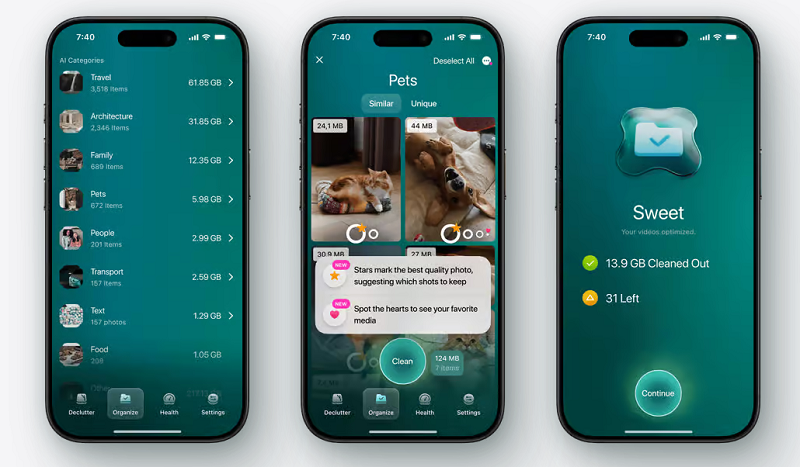
- Browse your library, organized into categories by AI.
Declutter your photos and videos
- Remove duplicates and clutter all in one spot
Taking photos is simple, but managing them can be tricky. CleanMyPhone scans your iPhone for large videos, duplicates, blurry images, screenshots, and other unwanted files, giving you control over what to delete. - Review your largest videos
The quickest way to free up space is by deleting large, forgotten videos. Old concert recordings, travel footage... whatever it is, it’s time to clear it out.
Organize gallery and optimize iPhone storage
CleanMyPhone categorizes and groups all your photos, so you can free up storage by removing similar photos and keeping only the best versions.
With Best Results, it’s effortless to spot your top shots.
Free up storage without deleting files
- Compress videos instead of deleting
You can replace your precious videos with compressed versions. Yes, no need to get rid of them if you can't part with your concert clips. Besides, the quality stays the same. - Convert Live Photos to still images
Did you know that one Live Photo uses the same amount of space as two or three regular photos? It’s easy to forget this feature is on, but fortunately, you can easily batch convert your Live Photos with just a few taps.
Monitor your iPhone's health status
Take charge of your storage
Keep your iPhone in top condition with Phone Health Status, Storage Analytics, and Device Security Analytics.
You’ll have a clear view of how much space your Photos app is using, both on your device and in iCloud, as well as which types of photos (pets, perhaps?) are taking up the most space.
Your important items stay safe
- Your photos are for your eyes only
CleanMyPhone doesn’t upload or store your photos — everything happens locally on your device. You can trust that only you have access to your memories. - You control what gets deleted
With CleanMyPhone, you decide which photos to remove. Accidentally deleted something? No problem — you can recover it from the Recently Deleted folder on your device.