
Smart auto-zoom. Zero editing.
Create professional screen recordings that keep your audience focused. FocalFlow's AI identifies every click and key action, automatically magnifying the important areas so your viewers never miss a detail.
Key Features
From recording to creation, without the complexity.
1. Automatic zoom
Never lose your viewer's attention. Each click is automatically magnified to emphasize the key detail clearly without any manual editing.
- Intelligent action detection
- Automatic content focus
- Sustained viewer attention
2. Professional animations
Enjoy smooth, gliding cursor movements expression during recording. Change its style and speed even after you've finished.
- Smooth, gliding cursor motion
- Customizable cursor styles
- Adjustable movement & speed
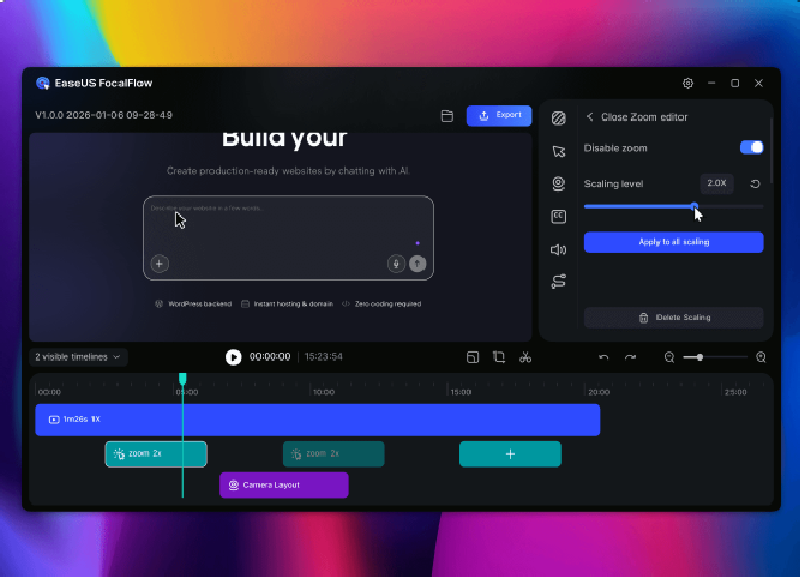
3. Personalize your recordings
Easily adjust backgrounds, margins, and rounded corners. Reposition and resize your webcam—all with just one click.
- Customize backgrounds, margins, and rounded corners
- Flexible webcam positioning and sizing
- One-click resizing for multiple formats
4. Simpler recording
Simple, but powerful. Record webcam, microphone, and system audio.
- Camera recording
- Microphone audio capture
- System audio recording
Designed for every scene
Create professional videos effortlessly with FocalFlow.
- Product Demos
- Tutorial Video
- Online Courses
- Marketing Videos
- Business Presentations
- Explore More
How to Use FocalFlow
- Recording
Record your screen and adjust settings. - Record on-screen actions
Click through your screen—everything you want to say gets recorded. - Auto-zoom generation
Auto-generate stunning videos with smart zoom—fully editable.